


OBD Auto Doctor car scanner
4.2906.00 Reviews
App Specs
- Version
- Varies with Device
- Updated On
- License
- Free
- Downloads
- 1,000,000+
- Developer
- Creosys Ltd
- Categories
- Auto & Vehicles
- Platform
- Android, iOS
Screenshots
 Analysis by AppCompare
If you’ve ever wanted to feel like a car whisperer, then the OBD Auto Doctor app might just be the thing for you. This nifty little app turns your smartphone into a pocket-sized diagnostic tool, letting you understand your car’s health like never before. Let’s dive into the details and see what makes this app a must-have for car enthusiasts and everyday drivers alike.
The first-week appeal: a useful new view of your car
The first time you connect an OBD-II adapter and see live readings on your phone, it’s easy to get drawn in. Instead of treating a warning light as a mystery, you can use OBD2 diagnostics to gather information before deciding what to do next. That first look is the app’s strongest early appeal: it makes vehicle data feel approachable, even if you have never used a code reader before.
That usefulness depends on having compatible hardware. The app is not a scanner by itself; it works with an ELM327-style adapter plugged into the car’s diagnostic port. Adapter quality and connection method can affect the experience, so I would check the adapter’s compatibility and connection instructions before buying one. If your phone cannot connect reliably, the app cannot provide a dependable reading, no matter how clear its screens are.
For a first test, I’d connect while parked, confirm the phone and adapter are communicating, and take time to understand the displayed information before relying on it. A brief setup check is less frustrating than trying to pair everything beside a road when a warning light has just appeared. It also helps separate a connection problem from an actual vehicle issue.
Getting Started with OBD Auto Doctor
First things first, setting up the OBD Auto Doctor is a breeze. I mean, I’m not exactly a tech wizard, but even I found the process super intuitive. You’ll need an OBD-II adapter, which connects to your car’s diagnostic port (usually somewhere under the dashboard). Once you’ve got the adapter, just pair it with your phone via Bluetooth or Wi-Fi, and voila—you're ready to go!
The app itself is straightforward. After downloading it from the App Store or Google Play, you’re prompted to connect to your vehicle. The user interface is clean and easy to navigate, which is a big plus if you’re like me and get overwhelmed by cluttered screens.
Features that Make a Difference
What sets this app apart is its comprehensive range of features. Whether you’re a gearhead or just someone who wants to avoid a surprise breakdown, OBD Auto Doctor has something for you.
Worth Reading Before You Choose

Flipboard Shows What News Apps Must Do Beyond the Feed

Switching to Android Auto Means Rethinking Your Driving Routine

Google Calendar Makes a Crowded Week Easier to Manage

Ludo King Makes the Most of the Minutes Between Plans

Baby Panda World Brings Quick Play to Modern Phones, but Its Game Library Feels Busy

ESPN’s Live Game View Makes Following Close Games Easier
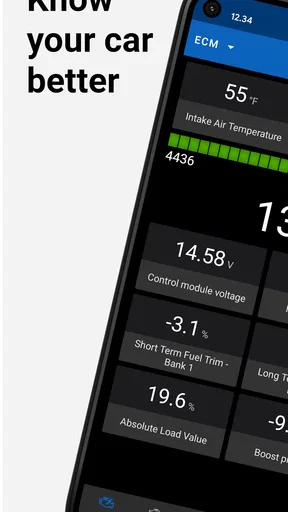
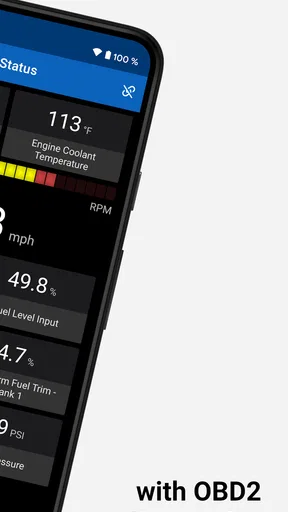
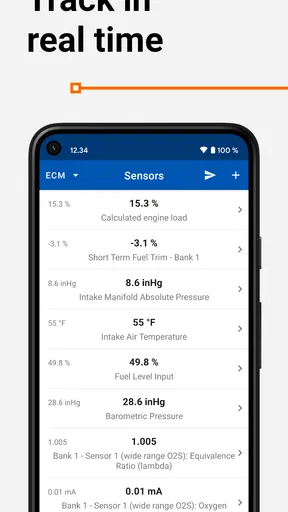
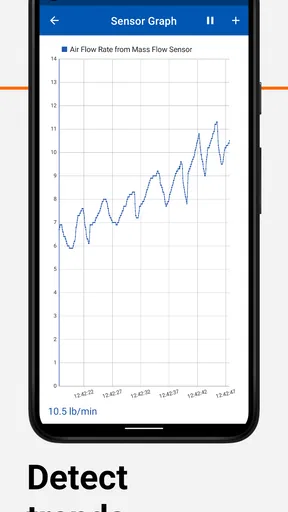
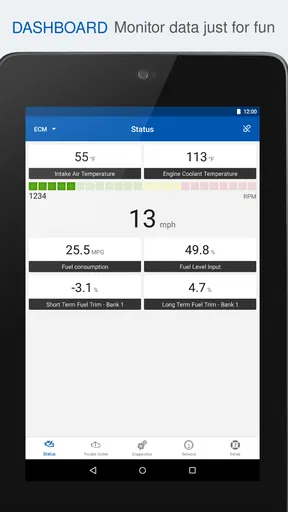
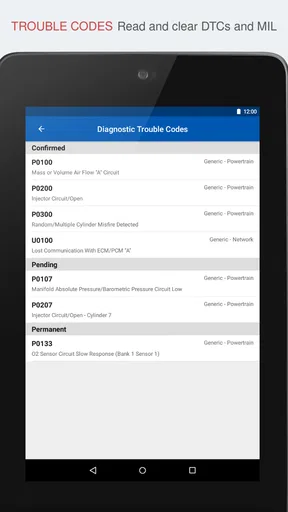
One of my favorite features is the real-time sensor data. You can monitor your car's RPM, fuel consumption, and engine temperature, among other things. It’s like having a dashboard within your dashboard! It’s not just about numbers, though. The app also translates those confusing engine error codes into plain English so you can actually understand what’s going on under the hood.
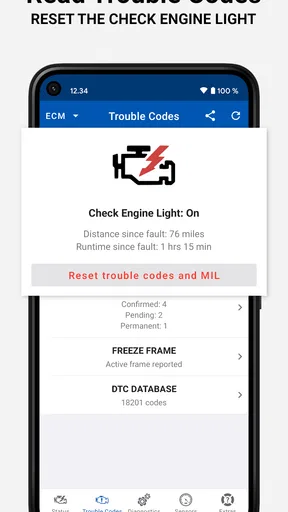
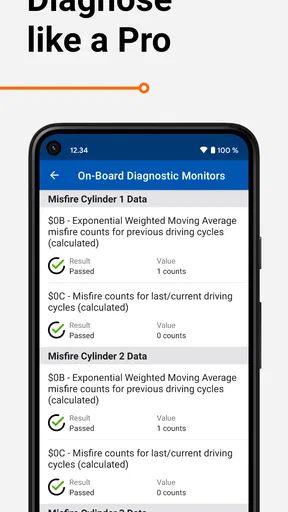
There’s also a diagnostics section where you can check for any problems that might be lurking. This feature is fantastic because it gives you a heads-up before things get serious. Plus, you can reset the check engine light if it’s lit up for no good reason—something I’ve done more times than I’d like to admit.
Making the information useful month after month
The readings become more valuable when I use them to answer a specific question rather than watch numbers for their own sake. If a car feels different on a commute, for example, sensor information can give a mechanic useful context alongside the driver’s description. I would note what the car was doing, when the warning appeared, and what the app reported, rather than relying on memory at the service desk.
A practical routine is to scan when a warning light comes on, save or write down the code and the conditions around it, and then check again after the cause has been addressed. Comparing before and after is more informative than repeatedly clearing a warning and hoping it stays away. A cleared light is not proof that a fault has been repaired; if the underlying issue remains, the warning may return.
This is also where the app can earn a lasting place for an owner who likes to understand maintenance decisions. It offers a middle ground between ignoring a dashboard warning and immediately buying a dedicated professional scanner. For someone who only wants a one-time answer, borrowing a reader or asking a repair shop to scan the car may be simpler. For a driver who expects to use the adapter occasionally over several years, having diagnostics ready on a phone can be more convenient.
Performance and Usability
Performance-wise, the app runs smoothly. I didn’t experience any lag or crashes, which is crucial when you’re dealing with real-time data. The updates are frequent, ensuring the app stays compatible with the latest car models and OBD-II adapters. It’s obvious the developers are committed to maintaining a high-quality user experience.
Usability is top-notch. The app supports a plethora of languages, making it accessible to a global audience. It’s also compatible with all car brands that use the OBD-II standard, so whether you drive a Ford or a Ferrari, you’re covered.
Maintenance without turning it into a hobby
I would treat the app as a check-in tool, not something that needs to run on every trip. Keeping the adapter available for occasional scans avoids turning routine driving into a stream of readings to monitor. A quick scan before a longer journey can be reassuring if the car has recently shown a warning, while regular live-data sessions make more sense when you are deliberately investigating a symptom.
When using sensor readings, compare like with like: similar driving conditions, a warmed-up engine when appropriate, and the same measurement rather than a random collection of values. A single number without context can be misleading. The app can help you collect clues, but it does not replace the vehicle’s service guidance or a qualified technician’s inspection when the problem affects safety or drivability.
That distinction matters for buyers deciding whether to pay for more capability. OBD Auto Doctor is free to download, with in-app purchases ranging from $4.49 to $84.99 per item. I’d start by confirming that the free experience and my adapter suit my needs, then consider a purchase only if I know which extra capability I’ll actually use. The app is made by Creosys Ltd, has a 4.2 average from around 26,000 ratings, and has passed one million installs. It is rated for Everyone and has been available since July 31, 2012.
Where the routine can become tiring
The main friction is the chain of dependencies: a compatible car, a working adapter, a phone connection, and enough understanding to interpret what appears. An app can make a code easier to read, but a plain-language explanation is not the same as a confirmed diagnosis. Similar symptoms can have different causes, and a code points toward an area to investigate rather than naming a guaranteed repair.
That is why I would not use a light-reset option simply to make the dashboard look normal before a trip or inspection. Clearing a code can remove information that would help with diagnosis, and it does not fix the fault. If the warning relates to a serious symptom, or the vehicle runs roughly, loses power, overheats, or behaves unsafely, I would stop treating this as a phone-app question and get the car checked professionally.
There is also a trade-off in choosing a phone-based tool over a dedicated scanner. OBD Auto Doctor is convenient if I already have a suitable adapter and want readable diagnostics without carrying another device. A standalone scanner may be a better fit for someone who wants a purpose-built tool, does not want to pair a phone, or needs a workflow tailored to regular repair work. Neither option makes every vehicle fault obvious, so expectations matter more than the shape of the screen.
Is It Worth It?
Now, let’s talk about the cost. The app offers a free version, which is great for basic diagnostics. However, for more advanced features, like detailed sensor data and diagnostics, a subscription is needed. It might seem like a downside, but trust me, the extra features are worth every penny if you're serious about keeping your car in tip-top shape.
Additionally, considering how much you’d pay for a mechanic to run these same diagnostics, the app is a steal. You can even use it to negotiate repairs, as you'll know exactly what needs fixing.
Who gets lasting value from it?
I think this is a sensible fit for curious drivers who want to understand a check-engine warning before calling a garage, owners who already have an ELM327-compatible adapter, and hands-on motorists who are comfortable treating readings as clues. It can make a repair conversation more specific: you can describe the warning and share what you observed instead of arriving with only “the light came on.” That is useful without pretending the phone has replaced a mechanic.
I would skip it if I wanted a guaranteed diagnosis with no hardware setup, if I rarely drive and would use a scanner only once, or if I was looking for a tool that automatically resolves faults. It is also not the right answer to every dashboard alert. OBD-II diagnostics focus on information the vehicle makes available through that system; a fault outside that scope may require a different inspection or equipment. When safety is at stake, professional help is the better choice.
For an everyday example, imagine the check-engine light appears on the way home from work, but the car still feels normal. I’d pull over somewhere safe, avoid trying to diagnose while driving, and scan only once parked. I’d record the code and any symptoms, then decide whether the car can be driven to a repair shop or needs more urgent attention. If the light is accompanied by rough running or another serious change, I would not use a reassuring-looking screen as permission to keep driving.
Final Thoughts
So, is the OBD Auto Doctor worth the download? Absolutely. It’s a powerful tool that puts you in control of your car’s health. Whether you’re a DIY mechanic or just want to avoid getting ripped off at the shop, this app has got your back. It’s like having a personal mechanic in your pocket, and who wouldn’t want that?
If you’re ready to take charge of your car’s diagnostics, give OBD Auto Doctor a try. It’s user-friendly, packed with features, and just might save you a ton of money in the long run. Check it out on the App Store or Google Play, and start your journey to becoming a car whisperer today!
My long-term verdict
After the novelty of watching live values wears off, the lasting benefit is having a practical way to collect clues when a warning appears. That value is occasional rather than constant: a useful scan can help you prepare for a repair conversation, but it should not become a reason to chase every fluctuation or keep clearing alerts. The app works best as a small part of sensible maintenance, alongside your own observations and a mechanic’s judgement.
OBD Auto Doctor is a free app in the Auto & Vehicles category, and its long history gives it a place among familiar phone-based diagnostic options. I would keep it installed if I owned a compatible adapter and expected to use diagnostics more than once. If I had no adapter, no interest in vehicle data, and no intention of learning what codes mean, the setup and possible purchases would be more effort than value. For the right driver, though, it is a handy way to replace guesswork with better questions—not a substitute for repairs, but a useful companion when the dashboard asks for attention.
Pros
- Easy-to-use interface for quick navigation.
- Real-time data monitoring for accurate diagnostics.
- Compatible with a wide range of vehicles.
- Supports multiple diagnostic trouble codes.
- Regular updates enhance app performance.
Cons
- Requires a separate OBD2 adapter to function.
- Some advanced features need a premium upgrade.
- May not support all older car models.
- Bluetooth connection can occasionally drop.
- Limited customization options for reports.
FAQs for OBD Auto Doctor car scanner
What is OBD Auto Doctor and how does it work?
OBD Auto Doctor is a car diagnostic tool that connects to your vehicle's OBD-II system via a Bluetooth or Wi-Fi adapter. It provides real-time data and diagnostics, allowing you to read trouble codes, monitor engine performance, and reset the check engine light. It's compatible with most cars manufactured after 1996.
Is OBD Auto Doctor compatible with my vehicle?
OBD Auto Doctor is designed to work with OBD-II compliant vehicles, which includes most cars and light trucks manufactured in the United States after 1996. It's important to check your vehicle's manual or consult with the manufacturer to ensure compatibility with the OBD-II system.
What features does OBD Auto Doctor offer?
OBD Auto Doctor offers a wide range of features, including reading and clearing diagnostic trouble codes, monitoring real-time sensor data, and checking vehicle readiness for emissions testing. Additionally, it provides freeze frame data and supports multiple OBD-II parameters to help you maintain your vehicle's performance.
Are there any costs associated with using OBD Auto Doctor?
While the OBD Auto Doctor app itself may offer a free version, there might be in-app purchases or a premium version with additional features. Additionally, you'll need to purchase an OBD-II adapter to connect your smartphone or tablet to your vehicle. Prices for these adapters can vary.
How user-friendly is the OBD Auto Doctor app?
OBD Auto Doctor is designed with user-friendliness in mind, offering a clean and intuitive interface that guides users through the diagnostic process. The app provides detailed explanations of trouble codes and allows users to easily navigate through various features, making it suitable for both beginners and experienced car enthusiasts.


